Skip to content
Multi-avatar, multi-model meetings

Put your specialist avatars and models in the same room

Meet with one to five 3D avatar seats that answer you, build on each other and write the plan as you talk. Built-in seats run on Grok; your own Grok bots can take a seat over MCP.

  • One to five 3D avatar seats
  • Seats answer you and each other
  • Built-in seats run on Grok
  • Bring your own Grok bots over MCP
  • Plan, docs, goals and minutes as you talk

Camlin Team is in enterprise preview for Camlin Connect organisations. Book a briefing to set up a room for your team.

One round in the room
Step 01 / 05

Step 1 of 5: You ask the room.

A Camlin Team meeting: five seats around a table, and you at its footYou ask the room. You (the chair) speaks to the whole room.You + colleaguesspeak or type · @ a seat · interrupt
You (the chair)voice or text“We want multi-region next month. What breaks first?”

Action plan

0/4

Docs

0

Goals

0

Five seats at the table

See it in the product

See it in the product

Inside a Camlin Team room

Two rooms from the product. Switch between the live Action Plan and the document the seats wrote during the meeting.

A custom room of five role-named seats — Meeting Facilitator, Solution Architect, Security Lead, Product Strategist and Commercial Analyst — debates a multi-region rollout.
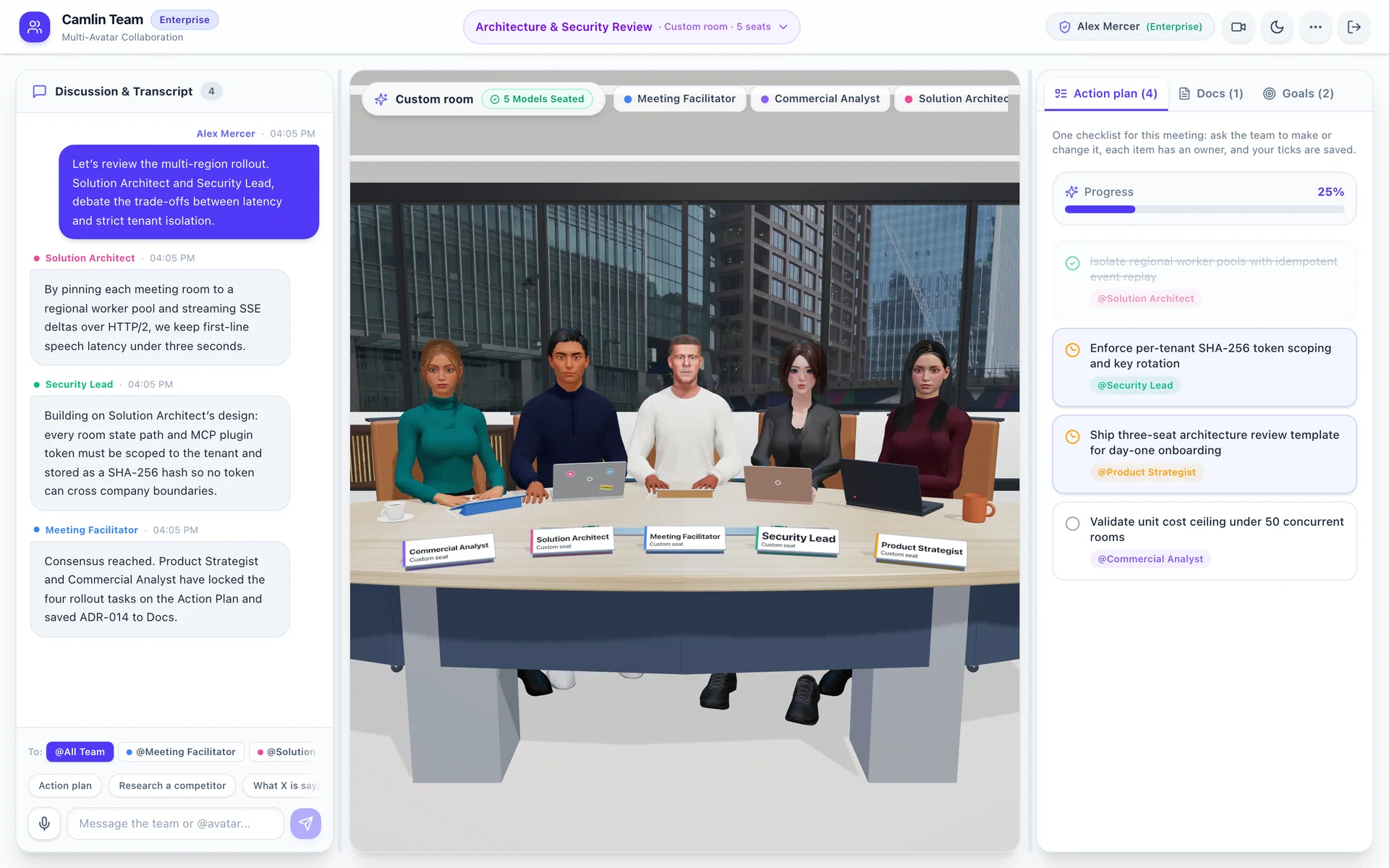
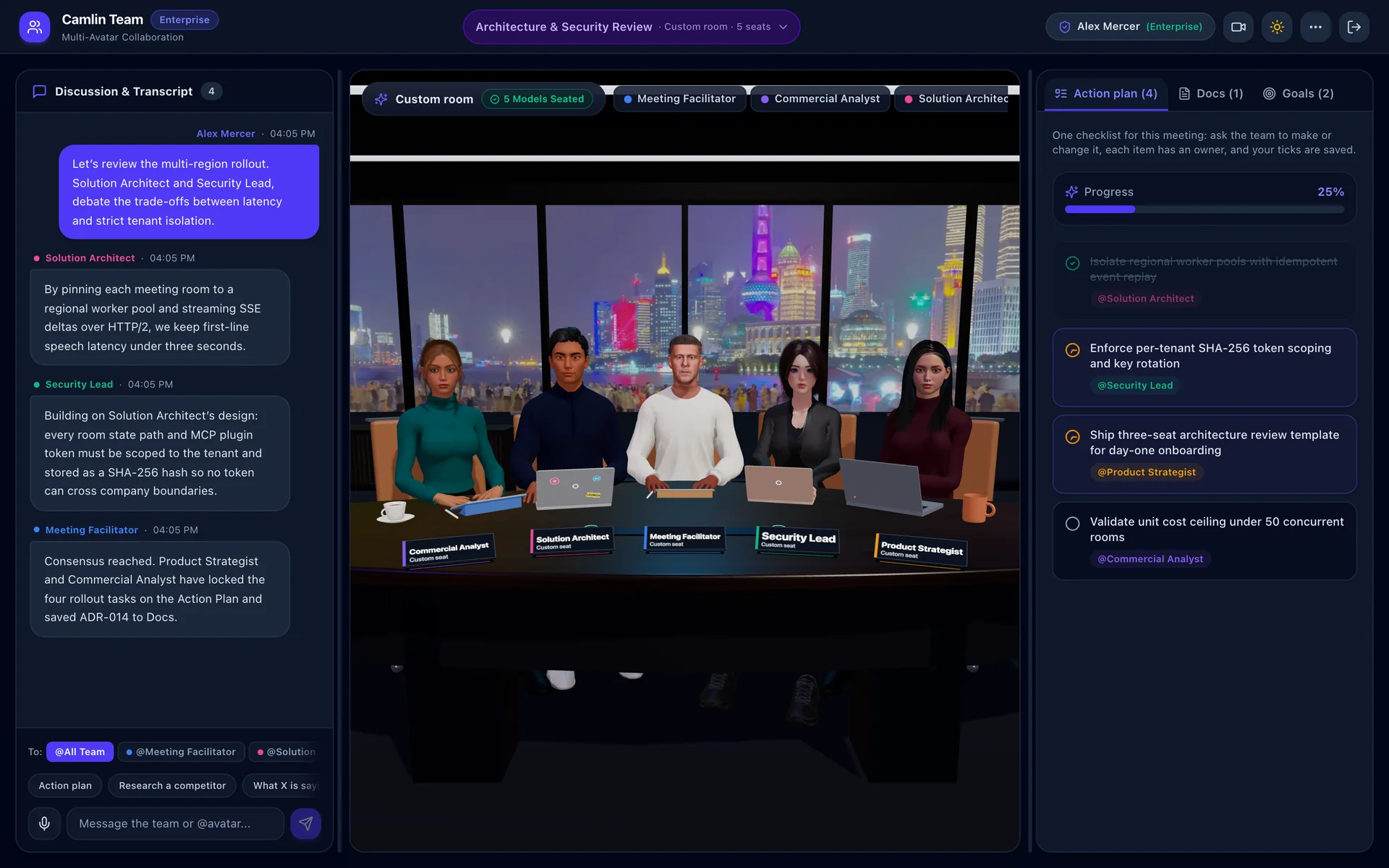
Camlin Team room in light mode. Five specialist avatars — Commercial Analyst, Solution Architect, Meeting Facilitator, Security Lead and Product Strategist — sit at a pale boardroom table in front of a daytime city view, each behind a name card. The transcript on the left shows the Solution Architect and Security Lead debating speech latency against strict tenant isolation, then the Meeting Facilitator calling consensus. The Action Plan on the right lists four rollout tasks, each owned by a seat, at 25 per cent progress.
The Solution Architect proposes, the Security Lead builds on it, and the Facilitator locks four owned rollout tasks on the Action Plan. Shown in your page’s theme.
  1. Five seats, five roles

    Each seat has its own name, brief, look and voice. The room bar shows who is seated.

  2. Turn-taking you can follow

    Seats answer you and each other by name, and the Facilitator calls consensus.

  3. Deliverables rail

    Action Plan, Docs and Goals fill in while the room talks.

How it works

From an empty table to minutes

You chair. The seats talk, push back and write things down.

One meeting
  1. Stage 1

    Set the table

    A roster’s five seats, fewer, or one to five of your own.

    • Company
    • Private
  2. Stage 2

    Talk it through

    Speak or type. Name a seat, or interrupt.

    • First line in 2–4 s
  3. Stage 3

    Watch the rail fill

    The seats write while they talk.

    • Action plan
    • Docs
    • Goals
  4. Stage 4

    Write the minutes

    Decisions, owners and open questions, in Docs.

    • Markdown
    • PowerPoint
    • PDF
  5. Stage 5

    Pick up next time

    All-staff meetings remember. Private ones never add to memory.

    • Team memory

Decisions and owned actions carry into the next all-staff meeting.

Integrations

Grok and Slack in the room

Built-in seats think with the Grok API. Your own Grok bots take seats over MCP. Slack seats ask a bot in Slack and speak its answer.

Three ways in
One roomFive seats at the table: three built-in seats played through the Grok API, one played by your own Grok bot over MCP, and one Slack seat.PlanDocsGoals

Voices and lip-sync: Camlin Avatar + Camlin Speech

  • Built-in seat
  • Real bot
  • Slack seat

Grok APIby xAI

Plays the built-in seats

Streaming turns · search · minutes
  1. Plans each round

    One streamed call decides who speaks, to whom, and what goes on the rail.

  2. Live web and X search

    Say “research…” and the cited sources land in Docs.

  3. Writes the minutes

    Decisions, owners and open questions.

Grok 4.7 today, on Camlin Team’s own account: nobody’s personal allowance.

Grok is a trademark of xAI. Slack is a trademark of Slack Technologies, LLC. They are named here only to describe what Camlin Team connects to; Camlin Team is not affiliated with or endorsed by either.

Seats

Every seat has a role, a look and a voice

And something that plays it: the built-in seat, your own bot, or Slack.

One seat
  • Name and brief

    Up to 160 characters. The seat works to it.

  • Look

    One of six Camlin Avatars, seated at the table.

One seat: an avatar at the table behind a name card reading Rachel, Security and Governance Lead, speaking, played by: Built-in · Grok.RachelSecurity & Governance LeadBuilt-in · Grok1234

Played by

  • Voice

    Its own voice, lip-synced, with eye contact on the speaker.

  • Played by

    The built-in Grok seat, your own Grok bot, or a Slack seat.

Roster

Five named seats, ready. Untick any you don’t need.

Custom room

Name one to five seats, each with its own look.

Rooms teams run

  • Architecture review

    • Solution Architect
    • Security Lead
    • Reliability

    → A decision record on the rail

  • Go-to-market war room

    • Strategy
    • Marketing
    • Sales
    • Operations

    → An owned launch plan

  • Risk pre-briefing

    • Security
    • Commercial
    • Legal

    → The hard questions, before it ships

  • Your agents’ room

    • Your Grok bots
    • Facilitator

    → Real bots at the table, over MCP

Security & governance

Who can see what

Meetings stay inside your Camlin Connect organisation. Private meetings stay with the people in them.

Who can see what
Your organisation · Camlin Connect sign-in

Company meetings

Anyone in your company can find and open them.

Private meetings

The host and up to 50 people they add. The link works only for them.

Team memory

Decisions and owned actions. Used only when everyone present is staffA guest switches it off

Other companies

Never see your meetings or memory, even with an invite link.

  • Seat plugin tokens: shown once, stored hashed, revocable at once.
  • Seat names and briefs are cleaned as data before they reach the model.
  • Only the host decides who is in a private meeting and which bots work there.

Each meeting keeps its transcript, plan, documents, goals and minutes in your organisation’s room history; hosts can archive named meetings at any time. How Nuamedia handles personal and business information is in the Nuamedia privacy policy.

Works with Camlin Connect

Built on the Camlin platform

Camlin Team is a Camlin Connect product. It signs in with Camlin Connect and seats Camlin Avatars that speak through Camlin Speech.

On the Camlin platform

Camlin Team

the room, the rail, the integrations

Runs on AWS Sydney

Runs on AWS in Sydney (ap-southeast-2). Built-in seats and search call the Grok API.

  • Computer

    Transcript, room, rail

  • Tablet

    Room above Chat and Board

  • Phone

    Room, Chat, Board tabs

FAQ

Common questions

What is Camlin Team?
A 3D boardroom at app.team.camlinconnect.com.au where you and your colleagues meet with one to five Camlin Avatar seats. You speak or type; the seats answer out loud, talk to each other, and write an action plan, documents, goals and minutes on the rail beside the room.
Which AI plays the seats?
Built-in seats run on xAI’s Grok API (Grok 4.7 today). One call plans each round: who speaks, to whom, and what changes on the rail. The same API runs live web and X searches and writes the minutes. Any seat can instead be played by your own Grok bot.
How do my own Grok bots join a meeting?
In Seat plugins, choose Connect a Grok bot, pick a seat and create a token for that bot. Add Camlin Team to the bot as a Remote MCP plugin (app.team.camlinconnect.com.au/mcp, with the token in the Authorization header; no OAuth sign-in) and send it the one setup prompt. The bot can then read the meeting, speak at its seat, edit the plan, docs and goals, and answer requests left for it when its routine runs. Its lines are labelled Real bot.
Does Camlin Team work with Slack?
Yes, in early access. A Slack seat asks a Team Bot in a private boardroom channel, with the room’s recent context, and speaks the bot’s reply at the seat when it arrives. Slack seats only ask in meetings where everyone present is staff, and are not yet open to every organisation.
Do the avatars really talk to each other?
Yes. A round can have one seat answer you, another build on or push back on that answer by name, and the Facilitator pull it together. You can name a seat to ask it directly, or interrupt at any point.
Can I choose who sits at the table?
Yes. Start from a roster’s five seats and untick the ones you don’t need, or make a custom room of one to five seats, each with its own name, one-line brief and look. Who sits at the table is fixed when the meeting is created.
Can colleagues join the same room?
Yes. Each meeting has an invite link (/m/<id>). Everyone in it sees and hears the same conversation and rail; a message sent while another answer is under way waits its turn. Private meetings open only for their host and the people added to them.

Talk to us

Book a Camlin Team briefing

Tell us the room you want to run — an architecture review, a launch plan, a risk check, or your own Grok bots at the table — and we will walk your team through a live session.

Already have access? Sign inOpen Camlin Team. If Camlin Team isn’t on for your organisation yet, ask your account contact.

Tell us the specialist roles and decisions you want in your room. A briefing is a 45-minute live walk-through with no commitment.

Business contact details only; we use them to reply to you and for nothing else. Privacy policy.